> ## Documentation Index
> Fetch the complete documentation index at: https://docs.img-processing.com/llms.txt
> Use this file to discover all available pages before exploring further.
# Resize Image
> Creates a new image by resizing an existing image
Learn how to resize an image
### Description
This endpoint creates a new image by resizing an existing image.
At the moment, there are three fit modes available:
 * `fill`: The image is resized to fill the specified dimensions, stretching/squishing the image to fit the provided dimensions.
This is the default fit mode.
* `contain`: The image is resized to fit within the specified dimensions, maintaining the aspect ratio, and adding
a letterbox if necessary.
* `cover`: The image is resized to cover the specified dimensions, maintaining the aspect ratio, cropping/clipping
the image if necessary.
Additionally, you can specify the background color for the letterbox when using the `contain` fit mode, and
the gravity for cropping or positioning the image when using the `cover` and `contain` fit modes.
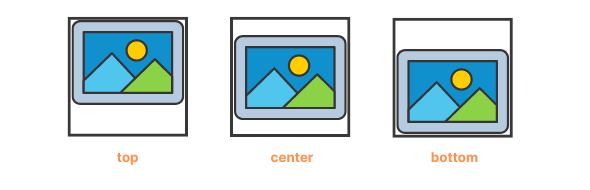
The next image shows the available gravity modes with a white `letterbox_color` and a `contain` fit mode:
* `fill`: The image is resized to fill the specified dimensions, stretching/squishing the image to fit the provided dimensions.
This is the default fit mode.
* `contain`: The image is resized to fit within the specified dimensions, maintaining the aspect ratio, and adding
a letterbox if necessary.
* `cover`: The image is resized to cover the specified dimensions, maintaining the aspect ratio, cropping/clipping
the image if necessary.
Additionally, you can specify the background color for the letterbox when using the `contain` fit mode, and
the gravity for cropping or positioning the image when using the `cover` and `contain` fit modes.
The next image shows the available gravity modes with a white `letterbox_color` and a `contain` fit mode:
 ***
## OpenAPI
````yaml openapi.json post /v1/images/{image_id}/resize
openapi: 3.1.0
info:
title: IMG Processing API
description: >
This powerful and flexible API provides a wide range of
image manipulation and analysis capabilities, allowing developers to
integrate advanced image processing
features into their applications with ease.
version: 1.0.0
servers:
- url: https://api.img-processing.com
description: IMG Processing API Server
security:
- ApiKeyAuth: []
paths:
/v1/images/{image_id}/resize:
post:
tags:
- Transformation Endpoints
summary: Resize Image
description: >-
This endpoint creates a new image by resizing an existing image.
At the moment, there are three fit modes available:
Fit Modes
Available fit modes
- fill: The image is resized to fill the specified dimensions,
stretching/squishing the image to fit the provided dimensions. This is
the default fit mode.
- contain: The image is resized to fit within the specified dimensions,
maintaining the aspect ratio, and adding a letterbox if necessary.
- cover: The image is resized to cover the specified dimensions,
maintaining the aspect ratio, cropping/clipping the image if necessary.
Additionally, you can specify the background color for the letterbox
when using the contain fit mode, and the gravity for cropping or
positioning the image when using the cover and contain fit modes.
operationId: resize
parameters:
- in: path
name: image_id
schema:
type: string
description: >-
The unique identifier of the image. This identifier is used to
reference the image in subsequent requests.
required: true
requestBody:
content:
application/json:
schema:
type: object
properties:
width:
type: integer
minimum: 1
maximum: 10000
description: >-
The width of the image to resize. It must be an integer
greater than 0 and less than 10000. If not provided, the
resized image will keep the aspect ratio of the original
image.
height:
type: integer
minimum: 1
maximum: 10000
description: >-
The height of the image to resize. It must be an integer
greater than 0 and less than 10000. If not provided, the
resized image will keep the aspect ratio of the original
image.
name:
type: string
minLength: 1
maxLength: 30
description: >-
The name of the resized image. It is used to identify the
image on the dashboard.
letterbox_color:
type: string
description: >-
The color of the letterbox when using the contain fit mode.
It can be a color name, a hex color code, or transparent.
position:
type: string
enum:
- center
- top
- right
- bottom
- left
- top-left
- top-right
- bottom-left
- bottom-right
description: >-
The gravity position of the image when using the cover or
contain fit modes.
fit:
type: string
enum:
- cover
- contain
- fill
description: The fit mode to use when resizing the image.
examples:
- width: 300
height: 200
name: resized-image
letterbox_color: transparent
position: center
fit: contain
responses:
'201':
description: The API will return the Image object in the response body.
content:
application/json:
schema:
$ref: '#/components/schemas/ImageObject'
'401':
description: >-
Error object for unauthorized access. Probably due to missing or
invalid API key.
content:
application/json:
schema:
$ref: '#/components/schemas/UnauthorizedError'
'403':
description: >-
Error object for forbidden access. Probably due to insufficient
permissions.
content:
application/json:
schema:
$ref: '#/components/schemas/ForbiddenError'
'422':
description: Error object for validation errors.
content:
application/json:
schema:
$ref: '#/components/schemas/ValidationError'
'429':
description: Error object for rate limit exceeded.
content:
application/json:
schema:
$ref: '#/components/schemas/RateLimitError'
5XX:
description: Error object for internal server errors.
content:
application/json:
schema:
$ref: '#/components/schemas/ServerError'
components:
schemas:
ImageObject:
type: object
properties:
id:
type: string
description: >-
The unique identifier of the image. This identifier is used to
reference the image in subsequent requests.
name:
type: string
description: >-
The name of the image. This name is provided when uploading the
image and is the way the image is identified in your account. It is
not unique, in fact, each transformation you make to an image will
create a new image with the same name.
url:
type:
- string
- 'null'
description: >-
The public URL of the image. By default, this URL is not available
and will be `null`. You can make the image public by using the
publish endpoint. Once the image is public, the URL will be updated
with the public UR.
width:
type: number
description: The width of the image in pixels.
height:
type: number
description: The height of the image in pixels.
format:
type: string
enum:
- png
- jpeg
- webp
description: >-
The format of the image. The format can be one of the following:
`jpeg`, `png`, `webp`
size:
type: number
description: >-
The estimated size of the image in bytes. The size is an estimate
and may not be exact since images can be compressed or optimized
depending on the format and quality settings used during processing.
created_at:
type: string
format: date-time
description: >-
The date and time when the image was created. The date and time are
in ISO 8601 format.
required:
- id
- name
- width
- height
- format
- size
- created_at
title: Image Object
description: >-
The Image object represents an image processed using the IMG Processing
API. The object contains information about the image, such as its URL,
size, and format. The Image object is returned in the response body of
all image processing requests.
examples:
- id: image_etm0g3x5iap4cld1qcfsjvo2
name: Processed Image
url: >-
https://storage.img-processing.com/images/image_etm0g3x5iap4cld1qcfsjvo2
width: 460
height: 460
format: jpeg
size: 282000
created_at: '2021-09-01T12:00:00.000Z'
UnauthorizedError:
type: object
properties:
type:
type: string
description: The type of error
error:
type: string
description: The title of the error
status:
type: number
const: 401
description: The status of the error
message:
type: string
description: The error message
required:
- type
- error
- status
- message
title: Unauthorized Error
description: >-
Error object for unauthorized access. Probably due to missing or invalid
API key
examples:
- type: https://docs.img-processing.com/errors/unauthorized
error: Unauthorized
status: 401
message: API key is required.
ForbiddenError:
type: object
properties:
type:
type: string
description: The type of error
error:
type: string
description: The title of the error
status:
type: number
const: 403
description: The status of the error
message:
type: string
description: The error message
required:
- type
- error
- status
- message
title: Forbidden Error
description: >-
Error object for forbidden access. Probably due to insufficient
permissions.
examples:
- type: https://docs.img-processing.com/errors/forbidden
error: Forbidden
status: 403
message: You are not allowed to access this image.
ValidationError:
type: object
properties:
type:
type: string
description: The type of error
error:
type: string
description: The title of the error
status:
type: number
const: 422
description: The status of the error
errors:
type: array
items:
type: string
description: The validation errors
required:
- type
- error
- status
- errors
title: Validation Error
description: Error object for validation errors
examples:
- type: https://docs.img-processing.com/errors/validation-error
error: Validation Error
status: 422
errors:
- '{field or param} {error message}'
RateLimitError:
type: object
properties:
type:
type: string
description: The type of error
error:
type: string
description: The title of the error
status:
type: number
const: 429
description: The status of the error
message:
type: string
description: The error message
required:
- type
- error
- status
- message
title: Rate Limit Error
description: Error object for rate limit exceeded.
examples:
- type: https://docs.img-processing.com/errors/too-many-requests
error: Too Many Requests
status: 429
message: Rate limit exceeded. Try again later.
ServerError:
type: object
properties:
type:
type: string
description: The type of error
error:
type: string
description: The title of the error
status:
type: number
description: The status of the error
message:
type: string
description: The error message
required:
- type
- error
- status
- message
title: Server Error
description: Error object for internal server errors.
examples:
- type: https://docs.img-processing.com/errors/internal-error
error: Internal Error
status: 500
message: >-
An unexpected error occurred. Please try again later. If the problem
persists, contact support.
securitySchemes:
ApiKeyAuth:
type: apiKey
in: header
name: x-api-key
description: API Key for authentication
````
***
## OpenAPI
````yaml openapi.json post /v1/images/{image_id}/resize
openapi: 3.1.0
info:
title: IMG Processing API
description: >
This powerful and flexible API provides a wide range of
image manipulation and analysis capabilities, allowing developers to
integrate advanced image processing
features into their applications with ease.
version: 1.0.0
servers:
- url: https://api.img-processing.com
description: IMG Processing API Server
security:
- ApiKeyAuth: []
paths:
/v1/images/{image_id}/resize:
post:
tags:
- Transformation Endpoints
summary: Resize Image
description: >-
This endpoint creates a new image by resizing an existing image.
At the moment, there are three fit modes available:
Fit Modes
Available fit modes
- fill: The image is resized to fill the specified dimensions,
stretching/squishing the image to fit the provided dimensions. This is
the default fit mode.
- contain: The image is resized to fit within the specified dimensions,
maintaining the aspect ratio, and adding a letterbox if necessary.
- cover: The image is resized to cover the specified dimensions,
maintaining the aspect ratio, cropping/clipping the image if necessary.
Additionally, you can specify the background color for the letterbox
when using the contain fit mode, and the gravity for cropping or
positioning the image when using the cover and contain fit modes.
operationId: resize
parameters:
- in: path
name: image_id
schema:
type: string
description: >-
The unique identifier of the image. This identifier is used to
reference the image in subsequent requests.
required: true
requestBody:
content:
application/json:
schema:
type: object
properties:
width:
type: integer
minimum: 1
maximum: 10000
description: >-
The width of the image to resize. It must be an integer
greater than 0 and less than 10000. If not provided, the
resized image will keep the aspect ratio of the original
image.
height:
type: integer
minimum: 1
maximum: 10000
description: >-
The height of the image to resize. It must be an integer
greater than 0 and less than 10000. If not provided, the
resized image will keep the aspect ratio of the original
image.
name:
type: string
minLength: 1
maxLength: 30
description: >-
The name of the resized image. It is used to identify the
image on the dashboard.
letterbox_color:
type: string
description: >-
The color of the letterbox when using the contain fit mode.
It can be a color name, a hex color code, or transparent.
position:
type: string
enum:
- center
- top
- right
- bottom
- left
- top-left
- top-right
- bottom-left
- bottom-right
description: >-
The gravity position of the image when using the cover or
contain fit modes.
fit:
type: string
enum:
- cover
- contain
- fill
description: The fit mode to use when resizing the image.
examples:
- width: 300
height: 200
name: resized-image
letterbox_color: transparent
position: center
fit: contain
responses:
'201':
description: The API will return the Image object in the response body.
content:
application/json:
schema:
$ref: '#/components/schemas/ImageObject'
'401':
description: >-
Error object for unauthorized access. Probably due to missing or
invalid API key.
content:
application/json:
schema:
$ref: '#/components/schemas/UnauthorizedError'
'403':
description: >-
Error object for forbidden access. Probably due to insufficient
permissions.
content:
application/json:
schema:
$ref: '#/components/schemas/ForbiddenError'
'422':
description: Error object for validation errors.
content:
application/json:
schema:
$ref: '#/components/schemas/ValidationError'
'429':
description: Error object for rate limit exceeded.
content:
application/json:
schema:
$ref: '#/components/schemas/RateLimitError'
5XX:
description: Error object for internal server errors.
content:
application/json:
schema:
$ref: '#/components/schemas/ServerError'
components:
schemas:
ImageObject:
type: object
properties:
id:
type: string
description: >-
The unique identifier of the image. This identifier is used to
reference the image in subsequent requests.
name:
type: string
description: >-
The name of the image. This name is provided when uploading the
image and is the way the image is identified in your account. It is
not unique, in fact, each transformation you make to an image will
create a new image with the same name.
url:
type:
- string
- 'null'
description: >-
The public URL of the image. By default, this URL is not available
and will be `null`. You can make the image public by using the
publish endpoint. Once the image is public, the URL will be updated
with the public UR.
width:
type: number
description: The width of the image in pixels.
height:
type: number
description: The height of the image in pixels.
format:
type: string
enum:
- png
- jpeg
- webp
description: >-
The format of the image. The format can be one of the following:
`jpeg`, `png`, `webp`
size:
type: number
description: >-
The estimated size of the image in bytes. The size is an estimate
and may not be exact since images can be compressed or optimized
depending on the format and quality settings used during processing.
created_at:
type: string
format: date-time
description: >-
The date and time when the image was created. The date and time are
in ISO 8601 format.
required:
- id
- name
- width
- height
- format
- size
- created_at
title: Image Object
description: >-
The Image object represents an image processed using the IMG Processing
API. The object contains information about the image, such as its URL,
size, and format. The Image object is returned in the response body of
all image processing requests.
examples:
- id: image_etm0g3x5iap4cld1qcfsjvo2
name: Processed Image
url: >-
https://storage.img-processing.com/images/image_etm0g3x5iap4cld1qcfsjvo2
width: 460
height: 460
format: jpeg
size: 282000
created_at: '2021-09-01T12:00:00.000Z'
UnauthorizedError:
type: object
properties:
type:
type: string
description: The type of error
error:
type: string
description: The title of the error
status:
type: number
const: 401
description: The status of the error
message:
type: string
description: The error message
required:
- type
- error
- status
- message
title: Unauthorized Error
description: >-
Error object for unauthorized access. Probably due to missing or invalid
API key
examples:
- type: https://docs.img-processing.com/errors/unauthorized
error: Unauthorized
status: 401
message: API key is required.
ForbiddenError:
type: object
properties:
type:
type: string
description: The type of error
error:
type: string
description: The title of the error
status:
type: number
const: 403
description: The status of the error
message:
type: string
description: The error message
required:
- type
- error
- status
- message
title: Forbidden Error
description: >-
Error object for forbidden access. Probably due to insufficient
permissions.
examples:
- type: https://docs.img-processing.com/errors/forbidden
error: Forbidden
status: 403
message: You are not allowed to access this image.
ValidationError:
type: object
properties:
type:
type: string
description: The type of error
error:
type: string
description: The title of the error
status:
type: number
const: 422
description: The status of the error
errors:
type: array
items:
type: string
description: The validation errors
required:
- type
- error
- status
- errors
title: Validation Error
description: Error object for validation errors
examples:
- type: https://docs.img-processing.com/errors/validation-error
error: Validation Error
status: 422
errors:
- '{field or param} {error message}'
RateLimitError:
type: object
properties:
type:
type: string
description: The type of error
error:
type: string
description: The title of the error
status:
type: number
const: 429
description: The status of the error
message:
type: string
description: The error message
required:
- type
- error
- status
- message
title: Rate Limit Error
description: Error object for rate limit exceeded.
examples:
- type: https://docs.img-processing.com/errors/too-many-requests
error: Too Many Requests
status: 429
message: Rate limit exceeded. Try again later.
ServerError:
type: object
properties:
type:
type: string
description: The type of error
error:
type: string
description: The title of the error
status:
type: number
description: The status of the error
message:
type: string
description: The error message
required:
- type
- error
- status
- message
title: Server Error
description: Error object for internal server errors.
examples:
- type: https://docs.img-processing.com/errors/internal-error
error: Internal Error
status: 500
message: >-
An unexpected error occurred. Please try again later. If the problem
persists, contact support.
securitySchemes:
ApiKeyAuth:
type: apiKey
in: header
name: x-api-key
description: API Key for authentication
````